

Abstract
This article explains how to design and implement a simple AI agent architecture in Ruby, focusing on core concepts like perception, reasoning, decision-making, and action rather than just code. Using Ruby's clarity, it demonstrates how modular components come together to form a goal-driven agent that interacts with its environment in a structured, understandable way.

This is not primarily an article about code. It's about the architecture and the patterns underneath AI agent development — the code is there to make them concrete. Ruby is the medium because its syntax gets out of the way: the reader's attention stays on the structure rather than on the language. The patterns transfer to any runtime.
What an AI agent is
An AI agent perceives its environment, reasons through a problem, makes decisions, and takes actions toward a goal. That definition is easy to state and does very little work, because "agentic AI system" has no settled meaning. Some definitions emphasize autonomy and decision-making; others foreground collaboration, adaptability, or a particular technical implementation.
The term spans a wide range of approaches and architectures. Rule-based systems run on predefined logic. Machine-learning-based agents adapt their behavior from training data. Published architectures run from single-agent frameworks to multi-agent systems. This article takes the simplest useful point on that spectrum: the ReAct (Reasoning and Action) architecture, implemented from scratch.
Agent architecture
The architecture of a first agent is simple, and it is common to most agentic systems. An Agent sits at the center. It holds a set of tools and an LLM, takes in information about its environment, reasons, and decides. Every action it takes is collected in a session, and individual operations within that session are stored as spans.
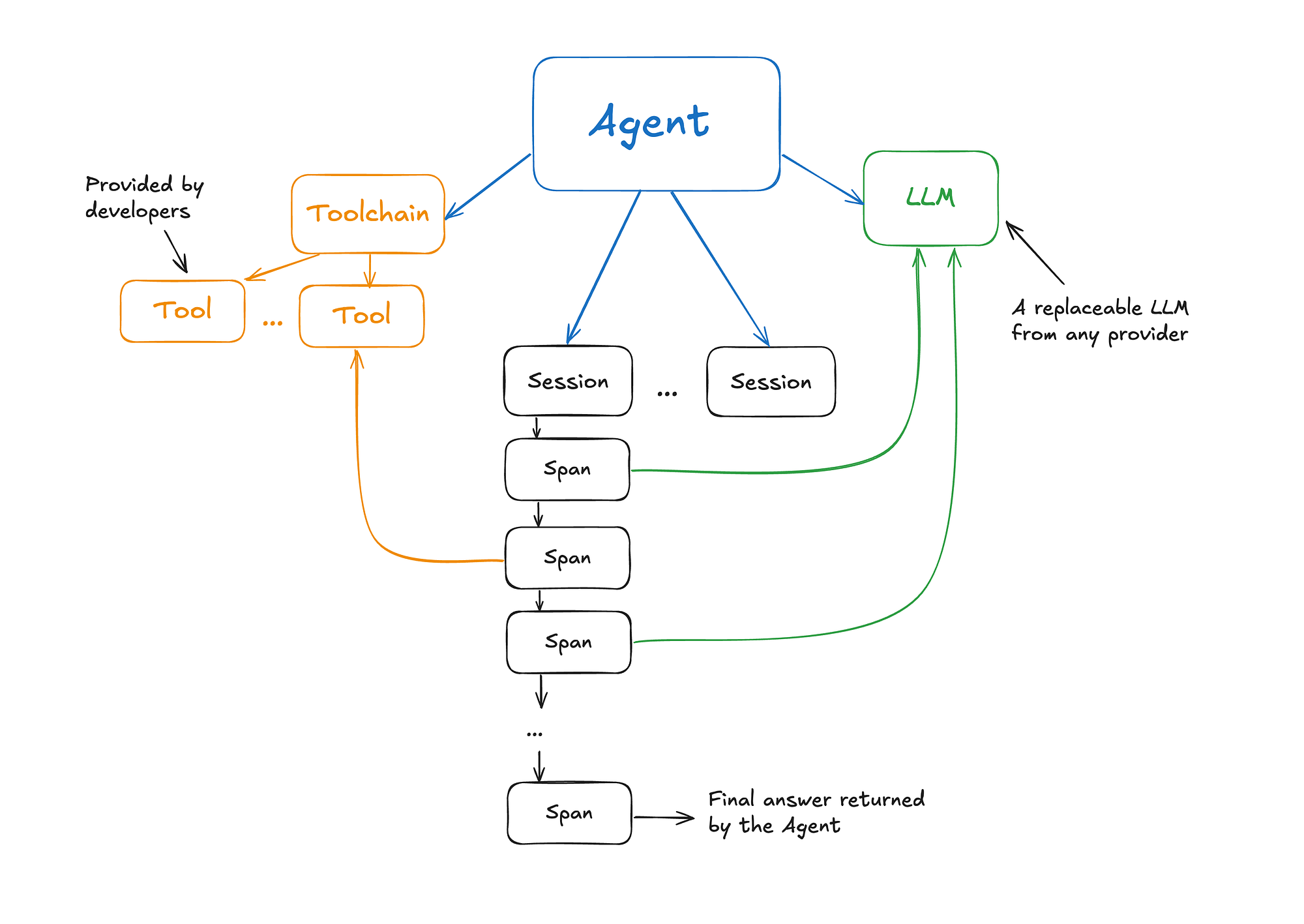 Figure 1. Agent, tools, LLM, and the session/span record of execution.
The reasoning mechanism inside the Agent is ReAct.
ReAct was introduced in October 2022, early in the LLM-agent era, by this paper. It closes the gap between reasoning and action. Where traditional systems separate planning from execution, ReAct interleaves them: the agent generates a thought, takes a task-specific action, observes the result, and continues. The consequence is that the plan is revisable mid-execution rather than fixed up front.
In practice this means the agent produces explicit reasoning traces, updates its action plan as it goes, handles situations that weren't anticipated at design time, and pulls information from external sources such as APIs or databases. Each decision is both recorded and actionable — which matters as much for debugging as it does for capability.
What follows is not a one-off agent but the foundation of a mini-framework (a Ruby gem) for implementing agents in Ruby applications. The design goal is modularity: components should be replaceable. Swapping the "engine" swaps the entire reasoning architecture and leaves the rest of the system intact. The point of building it by hand is that every piece stays legible.
The Agent
The Agent class is the entry point to the framework. It represents an entity that can be given a task, and it owns the lifecycle of the interaction.
High-level agent logic is deliberately separated from the low-level implementation of the loop that drives it. The Agent class should be usable regardless of the underlying architecture, and that architecture should be swappable with minimal effort. At its core an Agent is a generic entity combining a large language model and a collection of tools, both supplied at initialization.
It also maintains a list of sessions, since one agent instance may be invoked repeatedly with different tasks. Infinite loops are a standard failure mode of LLM-based agents, so an iteration limit is set at initialization, defaulting to 10.
-
execute: Accepts a task — a string representing a command or question from the user. This method initiates a session and forwards the task to the agent's engine. -
running?: Checks if the last session is still in progress. This design supports sequential session execution. When parallel task execution is supported, this will evolve to check whether any session is running. -
session: A getter that retrieves the last session.
class Agent
  include Concerns::Identifiable

  DEFAULT_MAX_ITERATIONS = 10

  def initialize(model:, tools: [], **options)
    super()
    @model = model
    @sessions = []
    @tools = tools.is_a?(Toolchain) ? tools : Toolchain.new(Array(tools))
    @max_iterations = options[:max_iterations] || DEFAULT_MAX_ITERATIONS
  end

  attr_reader :sessions, :model, :tools

  def execute(task)
    raise ArgumentError, "Task cannot be empty" if task.to_s.strip.empty?
    start_session
    react.reason(task)
  ensure
    complete_session
  end

  def running?
    session&.active? || false
  end

  def session
    @sessions.last
  end

  private

  def start_session
    complete_session
    @sessions << Session.new
    session.start
  end

  def complete_session
    session&.complete if running?
  end

  def react
    Regent::Engine::React.new(model, tools, session, @max_iterations)
  end
end
Session
A Session represents a single interaction cycle, from receiving a task to delivering the final result. It is the agent's execution record: every step taken in service of the task is captured there. Sessions carry context, make performance analyzable, and make the agent's behavior over time inspectable rather than opaque.
Tracking actions with spans. Each session holds an array of spans — discrete operations performed during the session. Spans give a granular view of the workflow. The session records its own start and end times, which makes duration analysis possible. The key methods:
-
start: Records the start time of the session. -
exec: Captures the execution of a single operation, adding it as a span, and returns the operation's output. -
complete: Marks the end of the session, logs the end time, and returns the final output by reading the last span's output. -
active?: Determines whether the session is still running by checking for a start time without an associated end time. -
result: Retrieves the final output of the session. -
replay: Re-emits the recorded spans without re-executing them, which is what makes a completed run reviewable after the fact.
Communication history. The messages attribute tracks the dialogue between the agent and the LLM, producing a full record of the interaction. This is what maintains context, and it is what makes the run debuggable after the fact.
Ownership. Sessions are created and held by the agent, and the engine receives the live session at construction. Everything the engine does — every model call, every tool execution — is written into that session rather than into the engine's own state. The session, not the agent, is the unit that carries a run's history.
By encapsulating the full lifecycle of a task execution, the Session class gives a structured and modular way to manage interactions. Whether the concern is performance tracking or debugging a workflow that went wrong, this is the layer that makes either possible.
class Session
  include Concerns::Identifiable
  include Concerns::Durationable

  class SessionError < StandardError; end
  class InactiveSessionError < SessionError; end
  class AlreadyStartedError < SessionError; end

  def initialize
    super()
    @spans = []
    @messages = []
    @start_time = nil
    @end_time = nil
  end

  attr_reader :id, :spans, :messages, :start_time, :end_time

  # Starts the session
  # @raise [AlreadyStartedError] if session is already started
  # @return [void]
  def start
    raise AlreadyStartedError, "Session already started" if @start_time
    @start_time = Time.now.freeze
  end

  # Executes a new span in the session
  # @param type [String] The type of span
  # @param options [Hash] Options for the span
  # @raise [InactiveSessionError] if session is not active
  # @return [String] The output of the span
  def exec(type, options = {}, &block)
    raise InactiveSessionError, "Cannot execute span in inactive session" unless active?
    @spans << Span.new(type: type, arguments: options)
    current_span.run(&block)
  end

  # Replays the recorded spans without re-executing them
  # @return [String] The result of the session
  def replay
    spans.each { |span| span.replay }
    result
  end

  # Completes the session and returns the result
  # @raise [InactiveSessionError] if session is not active
  # @return [String, nil] The output of the last span
  def complete
    raise InactiveSessionError, "Cannot complete inactive session" unless active?
    @end_time = Time.now.freeze
    result
  end

  # @return [Span, nil] The current span or nil if no spans exist
  def current_span
    @spans.last
  end

  # @return [String, nil] The output of the current span or nil if no spans exist
  def result
    current_span&.output
  end

  # @return [Boolean] Whether the session is currently active
  def active?
    start_time && end_time.nil?
  end

  # Adds a message to the session
  # @param message [Hash] The message to add
  # @raise [ArgumentError] if message is nil or empty
  def add_message(message)
    raise ArgumentError, "Message cannot be nil or empty" if message.nil? || message.empty?
    @messages << message
  end
end
Span
A Span is the smallest unit of work performed during a session — a single step in the execution of a task. Spans are what make the agent's behavior observable at every stage rather than only at the end.
The Span class tracks individual operations within a session. Each span has a type attribute defining the kind of operation it represents. The common types:
-
INPUT: Receiving input from the user or another system.
-
LLM_CALL: Communicating with the large language model.
-
TOOL_EXECUTION: Executing a specific tool or function.
-
MEMORY_ACCESS: Accessing or updating stored information.
-
ANSWER: Producing the final output for the user.
Spans record the start and end times of the operation, which makes execution time analyzable. They store the arguments passed and the resulting output, so each step is reconstructable in full.
-
run: Executes the given block, records timing, captures the output, and logs the operation. Errors are logged with the span's type and arguments, then re-raised — the span records the failure without swallowing it. -
running?andcompleted?: Indicate whether a span is in progress or has finished. -
replay: Re-emits the log for a completed span using its stored output, without executing anything.
The type is deliberately metadata rather than behavior. A span doesn't know how to call an LLM or run a tool; it wraps whatever block it's handed and records what happened. That is what keeps one class sufficient for every kind of step, and what makes adding a new step type a matter of adding a constant rather than a subclass.
Breaking the agent's actions into atomic units is what makes it possible to:
-
Identify bottlenecks in execution.
-
Analyze the agent's decision-making process.
-
Debug interactions against a record rather than a guess.
class Span
  include Concerns::Identifiable
  include Concerns::Durationable

  class InvalidSpanType < StandardError; end

  module Type
    INPUT = 'INPUT'.freeze
    LLM_CALL = 'LLM'.freeze
    TOOL_EXECUTION = 'TOOL'.freeze
    MEMORY_ACCESS = 'MEMO'.freeze
    ANSWER = 'ANSWER'.freeze
    def self.all
      constants.map { |c| const_get(c) }
    end
    def self.valid?(type)
      all.include?(type)
    end
  end

  # @param type [String] The type of span (must be one of Type.all)
  # @param arguments [Hash] Arguments for the span
  # @param logger [Logger] Logger instance
  def initialize(type:, arguments:, logger: Logger.new)
    super()
    validate_type!(type)
    @logger = logger
    @type = type
    @arguments = arguments
    @meta = nil
    @output = nil
  end

  attr_reader :arguments, :output, :type, :start_time, :end_time

  # @raise [ArgumentError] if block is not given
  # @return [String] The output of the span
  def run
    raise ArgumentError, "Span requires a block to execute" unless block_given?

    @output = log_operation do
      yield
    rescue StandardError => e
      logger.error(label: type, message: e.message, **arguments)
      raise
    end
  end

  # @return [String] The output of the span
  def replay
    log_operation(live: false) { @output }
  end

  # @return [Boolean] Whether the span is currently running
  def running?
    @start_time && @end_time.nil?
  end

  # @return [Boolean] Whether the span is completed
  def completed?
    @start_time && @end_time
  end

  # @param value [String] The meta value to set
  def set_meta(value)
    @meta = value.freeze
  end

  private

  attr_reader :logger, :meta

  def validate_type!(type)
    raise InvalidSpanType, "Invalid span type: #{type}" unless Type.valid?(type)
  end

  def log_operation(live: true, &block)
    @start_time = live ? Time.now.freeze : @start_time
    logger.start(label: type, **arguments)
    result = yield
    @end_time = live ? Time.now.freeze : @end_time
    logger.success(label: type, **({ duration: duration.round(2), meta: meta }.merge(arguments)))
    result
  end
end
Tools
Tools are how an agent reaches past its own logic to do specialized work. The Tool class represents a single external capability; the Toolchain manages the collection available to the agent.
class Tool
  def initialize(name:, description:)
    @name = name
    @description = description
  end

  attr_reader :name, :description

  def call(argument)
    raise NotImplementedError, "Tool #{name} has not implemented the call method"
  end

  def to_s
    "#{name} - #{description}"
  end
end
class Toolchain
def initialize(tools)
@tools = tools
end
attr_reader :tools
def find(name)
return nil if name.nil?
tools.find { |tool| tool.name.downcase == name.downcase }
end
def to_s
tools.map(&:to_s).join("\n")
end
endDecoupling specialized tasks into tools keeps the core agent logic stable. An agent adapts to a different scenario by updating the toolchain, not by changing the agent.
For example:
-
A chatbot agent could include tools for fetching weather updates, retrieving database records, or generating reports.
-
Tools can be added, removed, or replaced as requirements change, without touching the reasoning loop.
Tool and Toolchain are a small amount of machinery for a large amount of range: what the agent can do becomes a configuration decision rather than an architectural one.
The Engine
The Engine orchestrates reasoning, acting, and observing. Keeping it separate from the Agent is what allows:
-
Experimenting with different architectures without altering the rest of the framework.
-
Debugging interactions through sessions and spans.
-
Extending functionality by integrating custom tools or modifying the reasoning loop.
The default implementation, Regent::Engine::React, follows the ReAct pattern, but the design is open: a different class can be swapped in to explore another agent architecture while keeping the same API, replayability, and debuggability through sessions and spans.
The reason method drives the engine's workflow. It:
-
Takes the user's task as input.
-
Pushes user input to the session and initializes message history with the system prompt and the user message.
-
Enters a loop where it reasons, acts, and observes — using an LLM to generate answers, execute tools, and produce the final response.
This method is the interface every engine must implement to serve as a replacement engine and extend the framework.
Two failure modes get handled explicitly rather than left to chance, because both are things a model does routinely: naming a tool that doesn't exist, and emitting an action with no argument. Each terminates the session with a recorded failure answer instead of propagating a NoMethodError out of the loop. A parser for model output is a parser for untrusted input, and it should say what it rejected.
module Engine
  class React
    SEQUENCES = {
      answer: "Answer:",
      action: "Action:",
      observation: "Observation:",
      stop: "PAUSE"
    }.freeze

    def initialize(llm, toolchain, session, max_iterations)
      @llm = llm
      @toolchain = toolchain
      @session = session
      @max_iterations = max_iterations
    end

    attr_reader :llm, :toolchain, :session, :max_iterations

    def reason(task)
      initialize_session(task)

      max_iterations.times do
        content = get_llm_response
        session.add_message({ role: :assistant, content: content })
        return extract_answer(content) if answer_present?(content)

        if action_present?(content)
          tool, argument = parse_action(content)
          return session.result unless tool

          process_tool_execution(tool, argument)
        end
      end

      error_answer("Max iterations reached without finding an answer.")
    end

    private

    def initialize_session(task)
      session.add_message({ role: :system, content: Regent::Engine::React::PromptTemplate.system_prompt(toolchain.to_s) })
      session.add_message({ role: :user, content: task })
      session.exec(Span::Type::INPUT, message: task) { task }
    end

    def get_llm_response
      session.exec(Span::Type::LLM_CALL, type: llm.model, message: session.messages.last[:content]) do
        result = llm.invoke(session.messages, stop: [SEQUENCES[:stop]])

        session.current_span.set_meta("#{result.usage.input_tokens} → #{result.usage.output_tokens} tokens")
        result.content
      end
    end

    def extract_answer(content)
      answer = content.split(SEQUENCES[:answer])[1]&.strip
      success_answer(answer)
    end

    def parse_action(content)
      sanitized_content = content.gsub(SEQUENCES[:stop], "")
      lookup_tool(sanitized_content)
    end

    def process_tool_execution(tool, argument)
      result = session.exec(Span::Type::TOOL_EXECUTION, { type: tool.name, message: argument }) do
        tool.call(argument)
      end

      session.add_message({ role: :user, content: "#{SEQUENCES[:observation]} #{result}" })
    end

    def answer_present?(content)
      content.include?(SEQUENCES[:answer])
    end

    def action_present?(content)
      content.include?(SEQUENCES[:action])
    end

    def success_answer(content)
      session.exec(Span::Type::ANSWER, type: :success, message: content, duration: session.duration.round(2)) { content }
    end

    def error_answer(content)
      session.exec(Span::Type::ANSWER, type: :failure, message: content, duration: session.duration.round(2)) { content }
    end

    def lookup_tool(content)
      tool_name, argument = parse_tool_signature(content)
      tool = toolchain.find(tool_name)

      unless tool
        error_answer("No matching tool found for: #{tool_name}")
        return [nil, nil]
      end

      if argument.nil?
        error_answer("No argument provided for tool: #{tool_name}")
        return [nil, nil]
      end

      [tool, argument]
    end

    def parse_tool_signature(content)
      action = content.split(SEQUENCES[:action])[1]&.strip
      return [nil, nil] unless action

      tool_name, argument = action.split('|', 2).map(&:strip)
      argument = argument&.gsub('"', '')

      # Handle cases where argument is nil, empty, or only whitespace
      argument = nil if argument.nil? || argument.empty?

      [tool_name, argument]
    end
  end
end
A loop alone doesn't produce decisions. The component that turns it into an agent is the system prompt: the instructions that make the LLM behave in a way the loop can act on. The React engine uses a prompt template that:
-
Provides the LLM with explicit instructions on how to behave.
-
Includes examples of interactions between the user, LLM, and tools, which is what holds the output format stable enough to parse.
module Engine
  class React
    module PromptTemplate
      def self.system_prompt(tool_names)
        <<~PROMPT
          You are an assistant reasoning step-by-step to solve complex problems.
          Your reasoning process happens in a loop of Thought, Action, Observation.
          Thought - a description of your thoughts about the question.
          Action - pick an action from available tools. If there are no tools that can help, return an Answer saying you are not able to help.
          Observation - is the result of running a tool.

          ## Available tools:
          #{tool_names}

          ## Example session
          Question: What is the weather in London today?
          Thought: I need to get the weather in London
          Action: weather_tool | "London"
          PAUSE

          You will have a response with Observation:
          Observation: It is 32 degrees and Sunny

          ... (this Thought/Action/Observation can repeat N times)

          Thought: I know the final answer
          Answer: It is 32 degrees and Sunny in London
        PROMPT
      end
    end
  end
end
The prompt directs the model to produce a thought first — reasoning about how to approach the problem. Based on that reasoning it either returns a direct answer, if it has enough information, or identifies missing data. In the latter case it specifies an action to perform with one of the provided tools.
The agent executes that action with the given parameters, calls the tool, and returns the result to the model as an observation. The model responds with a new thought, followed by either an answer or the next action. The cycle continues until the model reaches a solution or hits the iteration limit.
The Logger
The Logger implementation is on GitHub, linked at the end of this article, and isn't reproduced here. Its role is to make each step of a session visible with enough detail to follow the agent's reasoning as it happens — which is what the examples below depend on.
The agent in practice
The first test targets a specific capability: answering a question about frequently changing information, so that retrieval is being tested rather than the LLM's parametric knowledge. Real-time cryptocurrency prices serve that purpose well.
The PriceTool class queries the CoinGecko API for the latest prices. USD is hardcoded as the return currency to keep the example focused.
class PriceTool < Tool
  def call(query)
    fetch_crypto_price(query, "usd")
  end

  private

  def fetch_crypto_price(crypto_id, currency)
    url = "https://api.coingecko.com/api/v3/simple/price"
    response = HTTP.get(url, params: { ids: crypto_id.downcase, vs_currencies: currency })

    if response.status.success?
      data = response.parse
      price = data.dig(crypto_id.downcase, currency)
      return "$#{price}"
    else
      raise "Error fetching data: #{response.status}"
    end
  end
end
Next, an LLM is instantiated through the Regent::LLM class, which looks up an API key in the environment based on the model passed as an argument. This example uses gpt-4o-mini, so OPENAI_API_KEY must be set.
model = Regent::LLM.new(model: "gpt-4o-mini")Then the price-fetching tool:
price_tool = PriceTool.new(name: "price_tool", description: "Get cryptocurrencies prices")And the agent, composed from the model and the tool:
agent = Agent.new(model: model, tools: [price_tool])With setup complete, the first question is the price of Bitcoin:
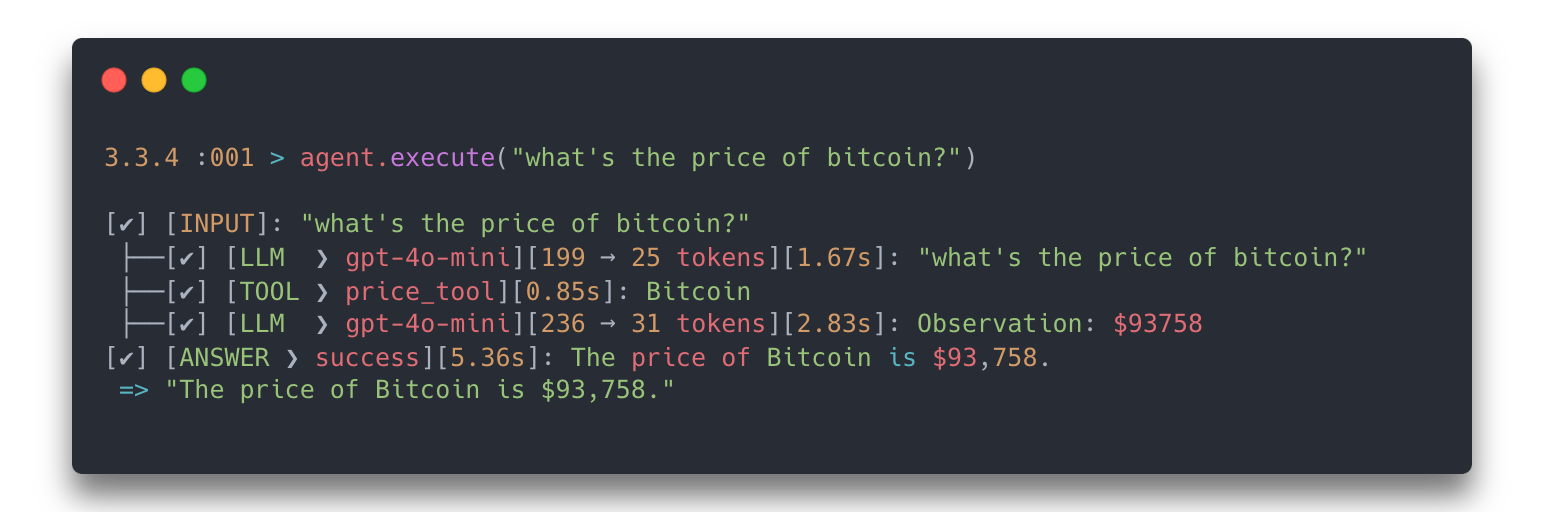 Figure 2. The agent resolves a single-tool query: one thought, one action, one observation, one answer.
The next case asks for two prices at once — Ethereum and Dash — with a deliberate spelling error introduced to test whether the agent recovers:
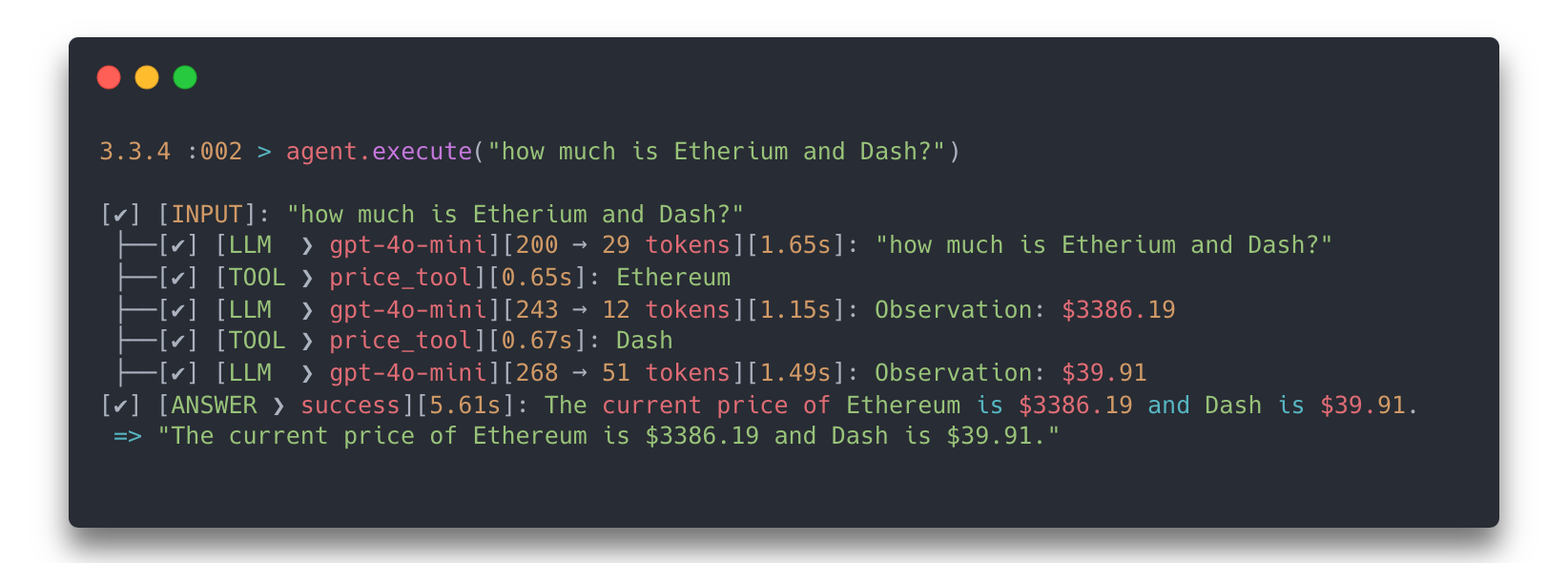 Figure 3. Multiple tool calls in a single session, with a misspelled input handled by the model.
A harder case: the price is not the goal. The question is which of several currencies is most or least expensive, which requires the agent to gather prices and then reason over them rather than report a lookup.
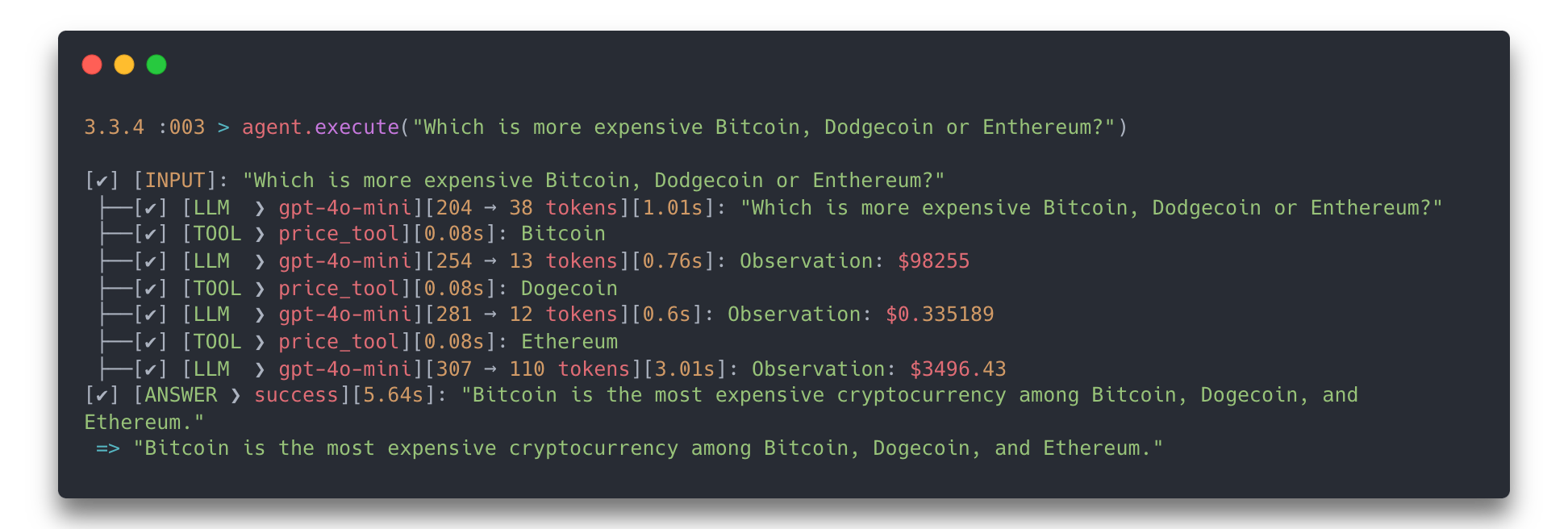 Figure 4. Retrieval followed by comparison — the observation feeds reasoning rather than the answer directly.
Finally, a task the agent has no tool for: the weather in London.
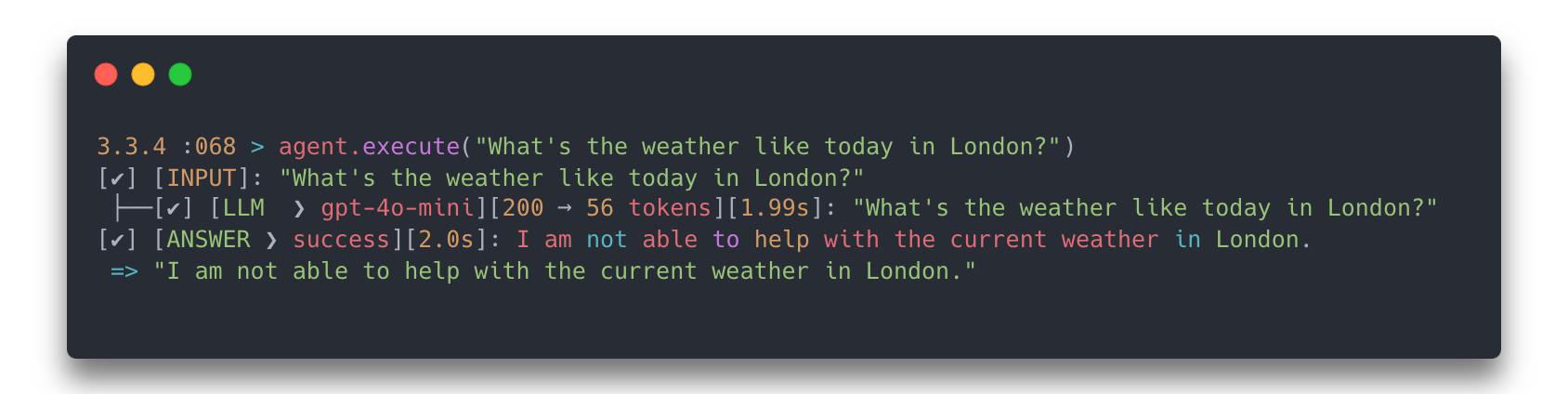 Figure 5. Out-of-scope request. The agent declines rather than fabricating.
With no weather tool in the toolchain, that outcome is the correct one — and declining is a behavior worth verifying explicitly, not an afterthought.
These examples are deliberately small, and the implementation has room to improve and bugs still to surface. The point they establish is narrow but real: the agent understands a request in natural language and performs the actions required to satisfy it, with every step of that process recorded and inspectable.
This is not AGI and it isn't trying to be. It's a specialized agent scoped to a specific set of tasks, and the scope is the design, not a limitation to apologize for.
Availability
These components are assembled into a Ruby gem, Regent, which supports building basic AI agents and extending them with custom instructions and new tools.
Issues, feedback, and contributions are welcome.
References
- Yao et al., ReAct: Synergizing Reasoning and Acting in Language Models (2022).
- Regent — the Ruby gem assembling the components described in this article.
- CoinGecko API — price data source used in the worked examples.